For most small and medium business owners in Southeast Asia, migrating from spreadsheets to cloud accounting is not simply a technology upgrade. It is the difference between reacting to financial problems and preventing them. Spreadsheets break under growth: version conflicts, manual entry errors, and zero real-time visibility are constant friction points. Platforms like Xero and Odoo now offer purpose-built tools that address exactly these limitations. This guide walks you through every practical step, from assessing your current setup to verifying your data post-migration, with regional context specific to Philippine and Singapore-based SMBs.
Table of Contents
-
Key Takeaways
-
Assessing your current setup before cloud migration
-
Choosing a platform and planning your migration
-
Executing the migration step by step
-
Verifying data accuracy and optimizing post-migration
-
What actually drives a successful migration
-
How Proseso Consulting supports your cloud accounting transition
-
FAQ
Key Takeaways
| Point | Details |
|---|---|
| Audit before you migrate | Inventory all spreadsheets and identify pain points before selecting a cloud platform. |
| Match the platform to your needs | Xero offers clean SMB accounting with a broad partner ecosystem; Odoo adds strong PH/SG localization, a free single-app starting point, and room to scale into inventory, CRM, and payroll. |
| Plan a phased rollout | Run spreadsheets alongside your cloud tool briefly to protect business continuity during transition. |
| Clean data before importing | Remove duplicates and archive old records before transferring financial data to reduce import errors. |
| Verify everything post-migration | Reconcile imported balances against original spreadsheets before fully decommissioning your old files. |
Assessing your current setup before cloud migration
Before selecting any platform or moving a single cell of data, you need a clear picture of what you are actually working with. Many business owners in the Philippines and Singapore underestimate how fragmented their spreadsheet environment has become. You may have one person maintaining a cash flow tracker, another running a separate accounts receivable log, and a third reconciling payroll manually. These files rarely talk to each other.
Start by cataloging every spreadsheet used in your finance function:
-
Accounts receivable and payable trackers — how many files, how often updated, and who owns each one
-
Bank reconciliation sheets — whether these are monthly, weekly, or ad hoc
-
Payroll and statutory contribution records — particularly relevant for Philippine SSS, PhilHealth, and Pag-IBIG filings, or Singapore CPF compliance
-
Tax summaries and VAT schedules — whether these are built manually each quarter or derived from other sheets
-
Profit and loss summaries — consolidated or by entity
Once you have the inventory, identify the specific breakdowns. Common pain points include formulas that return errors when new rows are added, files emailed back and forth causing version conflicts, and the complete absence of an audit trail when figures change. Cloud-native platforms like Xero and Odoo offer automated bank feeds and real-time dashboards that directly address these issues.
At this stage, define your core business requirements. These will guide your platform choice. Consider whether you need multi-user concurrent access, real-time reporting, integration with local payment gateways or e-invoicing systems, or a single platform that covers accounting alongside inventory and CRM. Odoo is worth noting here on both counts: it can run as standalone accounting today and, because the adjacent functions live on the same platform, expand into inventory or CRM later without a second migration.
Pro Tip: Document your current monthly close process step by step before migration. This becomes your baseline checklist for configuring workflows in your new cloud platform, and it will expose redundant steps you can eliminate entirely.
Choosing a platform and planning your migration
With your requirements defined, the platform choice becomes more straightforward. Xero and Odoo are the two platforms most relevant to Southeast Asian SMBs, but they serve different profiles.
| Feature | Xero | Odoo |
|---|---|---|
| Primary focus | Accounting and bookkeeping | Standalone accounting, or full ERP with accounting module |
| Ease of setup | High, minimal technical knowledge needed | Moderate to high, may need implementation support |
| Multi-currency support | Yes, with automatic exchange rates | Yes, with advanced configuration options |
| Local compliance (PH/SG) | General approach; relies on partner add-ons for deeper local needs | Strong, with dedicated PH and SG localization modules (chart of accounts, tax, statutory reports) |
| Scalability | Best for SMBs up to mid-market | Scales from SMB to enterprise |
| Pricing model | Fixed monthly tiers | One App Free (single app, unlimited users, single company); paid per-user Standard/Custom tiers; or free self-hosted Community edition. Bank sync and several automation features require a paid Enterprise plan. |
| Integrations | Large app marketplace | Extensive native module library |
| Bank feeds | SG: supported for major banks. PH: limited across all platforms (see note below) | SG: supported for major banks. PH: limited across all platforms (see note below) |
A note on Philippine bank feeds: limited automatic feed coverage in the PH is a banking-system constraint, not a platform one. Most local banks don’t yet expose the open-banking connections that power automatic feeds, so businesses on any cloud platform should expect to rely on CSV import or a third-party connector for now.
Xero suits businesses that primarily need clean, reliable accounting with minimal setup friction. Automated invoicing and mobile access are practical strengths, particularly for business owners who review financials on the move. Its local compliance, however, tends to be more general, leaning on third-party add-ons from its partner network when deeper Philippine or Singapore requirements come into play.
Odoo is more flexible than it first appears. It is often thought of as a full ERP, but it can also run as a standalone accounting solution without the other modules. Two things make it especially well-suited to this region. First, it ships with dedicated Philippine and Singapore localization — local chart of accounts, tax configurations, and statutory reporting built in rather than bolted on. Second, its One App Free plan covers a single app for unlimited users, so a single-company business can run Odoo accounting at no licensing cost, with the trade-offs that advanced features like direct bank synchronization require a paid Enterprise plan and that adding a second company or the Studio customization tool automatically moves you to a paid tier. And when the business is ready to integrate accounting with inventory, sales, or HR, those modules are already part of the same platform — no migration, no second system.
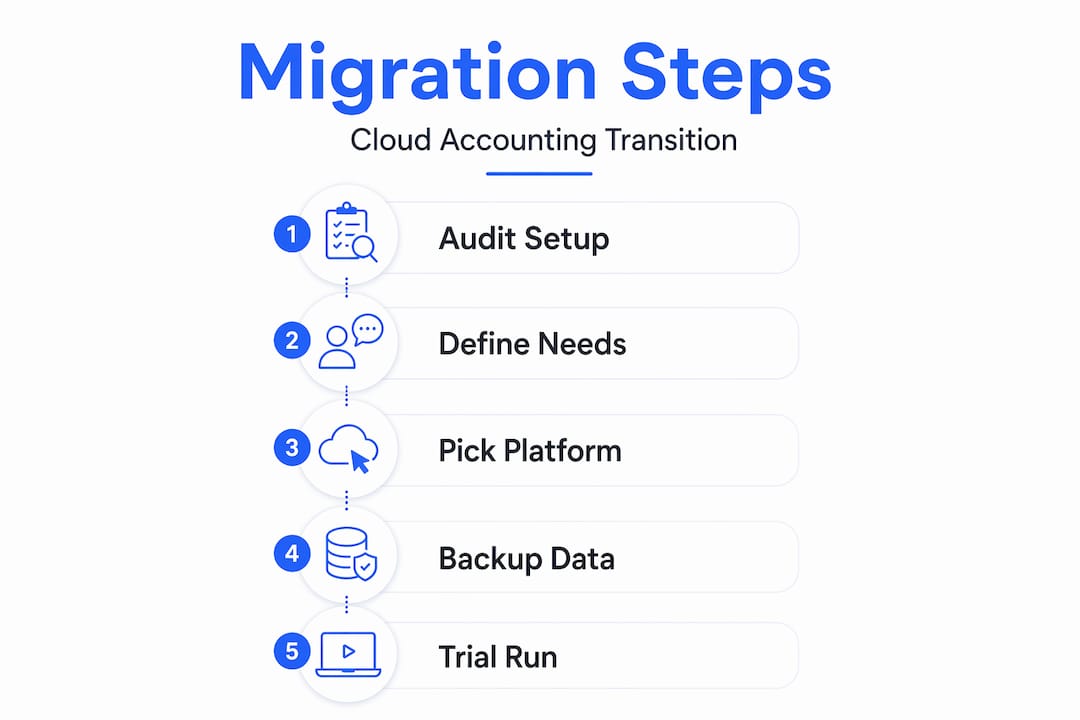
Once you have selected a platform, plan the migration in phases. A phased approach is not optional for most businesses. Transitioning gradually while staff continue using spreadsheets alongside the new system reduces errors and resistance during the adjustment period. A typical phased plan looks like this:
-
Phase 1 (Weeks 1 to 2): Set up the cloud environment, configure chart of accounts, connect bank feeds
-
Phase 2 (Weeks 3 to 4): Import historical data, conduct initial reconciliation, run parallel with spreadsheets
-
Phase 3 (Month 2): Train staff, go live on all transactions, decommission parallel spreadsheets
Timing matters significantly. Migrating mid-audit or during a busy close period increases complications and raises compliance risk. Target a migration window after a fiscal year-end or during a low-transaction month.
Backing up and cleaning your spreadsheet data before migration is not a preliminary step to skip. Remove duplicate vendor or customer records, standardize date formats, and archive historical records you will not be importing. These actions reduce import errors and shorten migration time considerably.
Pro Tip: Request a trial account from your chosen platform before committing. Run your last completed month through it manually to test whether the chart of accounts, tax codes, and currency settings match your actual business structure.
Executing the migration step by step
With preparation complete, the actual data transfer follows a logical sequence. Here is a step-by-step process applicable to both Xero and Odoo.
-
Export your data from spreadsheets. Export customer lists, supplier lists, opening balances, and transaction history as CSV files. Use consistent column headers and remove all formatting such as merged cells or conditional colors, which cloud importers cannot process.
-
Configure your chart of accounts. Before importing any transactions, set up your account structure within the platform. Both Xero and Odoo provide default chart of accounts templates you can adapt. Align these with your existing spreadsheet categories to maintain reporting continuity.
-
Import opening balances. Enter your trial balance as of the migration date. This is the single most critical data point because every subsequent report relies on it being accurate. Cross-check against your last audited financial statements.
-
Import contact records. Upload customers and suppliers using the platform’s CSV import tool. Verify that tax identification numbers, payment terms, and currency settings are correctly mapped.
-
Connect bank feeds where available. Bank feed coverage depends far more on the local banking system than on the accounting platform you choose. In Singapore, direct feeds for major banks such as DBS, OCBC, and UOB are well supported across cloud accounting tools, Xero and Odoo included. In the Philippines, automatic bank feeds remain limited for nearly every accounting platform on the market — not a shortcoming of any one tool, but a reflection of how few Philippine banks currently expose the open-banking connections these feeds rely on. For most PH accounts, plan for CSV import or a supported third-party connector, and note that Odoo’s automatic synchronization, where a feed exists, runs on its Enterprise plan. Where feeds are available, automated reconciliation reduces manual entry errors and accelerates the monthly close.
-
Configure automation rules. Set up recurring invoices, payment reminders, and reconciliation rules. This is where cloud accounting benefits become most visible: multiple team members can access live data simultaneously, from any location.
-
Run a parallel period. For at least two to four weeks, post all new transactions in the cloud system while maintaining your spreadsheets. Compare totals weekly. Discrepancies at this stage are far easier to resolve than after you have fully decommissioned the old files.
-
Train your team before going fully live. Staff training on cloud platforms is not a one-time event. Schedule structured sessions covering daily transaction entry, bank reconciliation, and report generation. Budget for at least two to three weeks of adjusted productivity as your team builds familiarity.
Pro Tip: Assign one internal owner for the migration project, not the entire finance team collectively. A single accountable person will track issues faster, escalate blockers earlier, and keep the timeline on schedule.
Verifying data accuracy and optimizing post-migration
Completing the import does not mean the migration is finished. The verification phase protects you from carrying errors forward into live reporting.
Prioritize the following checks:
-
Opening balance reconciliation: Confirm that opening balances in the cloud platform match your pre-migration trial balance exactly, account by account.
-
Accounts receivable aging: Compare the imported AR aging report against your spreadsheet log. Outstanding invoice amounts and due dates should match without exception.
-
Accounts payable verification: Confirm supplier balances, outstanding bills, and any prepayments are correctly reflected.
-
Bank reconciliation check: Reconcile the first full month of transactions in the cloud system and verify that the closing bank balance matches your actual bank statement.
The following table summarizes key post-migration checks and recommended timelines:
| Verification task | Timeline | Owner |
|---|---|---|
| Opening balance reconciliation | Day 1 post-import | Accountant or finance lead |
| AR and AP aging comparison | Week 1 | Finance team |
| First bank reconciliation | End of first full month | Accountant |
| Tax code and rate verification | Before first tax filing | Finance lead or external advisor |
| User access and permissions review | Week 1 | Business owner or IT |
Beyond verification, this is the moment to activate features you could not use in spreadsheets. Real-time financial dashboards give you a live view of cash position, receivables, and payables without preparing a report manually. Set up access controls so team members can see only what is relevant to their role. Both Xero and Odoo support role-based permissions that protect sensitive financial data while enabling collaboration.
Cloud accounting subscription models also replace large upfront software costs with predictable monthly fees, which improves cash flow planning. Combined with reduced IT overhead from eliminating on-premise servers, the financial case for migration extends well beyond productivity gains.
Finally, schedule a formal workflow review at the 60-day and 90-day marks. You will find processes to refine, modules to activate, and reporting templates to build. Cloud platforms reward ongoing configuration. The businesses that extract the most value are the ones that treat go-live as a starting point, not a finish line.
What actually drives a successful migration
Across SMBs in the Philippines and Singapore, the technical steps are consistently the easier part of a migration. What derails projects is rarely a failed data import — it is the human side.
Business owners often underestimate how much informal knowledge lives inside spreadsheets: a cell with a note explaining why a figure was adjusted in March, a tab tracking a loan repayment no one else knows about, a formula built by a former employee that no one fully understands. None of this transfers automatically. The most successful migrations include a documentation phase that captures knowledge from the people who manage the existing files, not just the files themselves.
The second common failure is trying to replicate the old spreadsheet structure inside the new platform. Odoo and Xero are built around transaction workflows, not ledger cells. Forcing them to behave like spreadsheets ignores their actual architecture. Businesses that let go of that instinct sooner get more value from the platform sooner.
On platform choice: Xero is a solid option for businesses that want clean, auditable accounting with minimal configuration and are comfortable relying on add-ons for local compliance. For most foreign-owned SMBs operating in the Philippines and Singapore, though, Odoo tends to be the stronger fit — its built-in local compliance, flexible free starting point, and room to scale into operations and HR on one system mean fewer compromises as the business grows. Migration planning and financial strategy should inform that decision, not follow it.
The businesses that handle migration best treat it as a finance transformation project, not an IT project.
How Proseso Consulting supports your cloud accounting transition
Proseso Consulting works with SMBs in the Philippines and Singapore that are ready to move beyond spreadsheets and build a finance function that scales. Whether you are evaluating platforms or already mid-migration, the firm’s team provides end-to-end accounting and finance services covering bookkeeping, payroll, tax compliance, and cloud system configuration using Xero and Odoo.

For businesses that need strategic direction alongside technical setup, Proseso Consulting’s CFO advisory services include migration planning, chart of accounts design, and post-migration financial reporting optimization. The firm’s experience across Southeast Asia’s compliance environments means you get a partner that understands both the platforms and the regulatory context your business operates in. Reach out to discuss your migration needs directly.
One Philippine-specific point worth raising early: neither Xero nor Odoo is BIR-accredited out of the box. Businesses subject to e-invoicing or Computerized Accounting System (CAS) requirements need to factor accreditation into their migration plan, not treat it as an afterthought. Proseso Consulting advises clients on how platform choice intersects with BIR compliance so the system you adopt holds up to local requirements.
FAQ
What is the best time to migrate from spreadsheets to cloud accounting?
The best time is after a fiscal year-end or during a low-transaction period. Migrating mid-audit increases compliance risk and makes reconciliation significantly more complex.
How long does a spreadsheet to cloud accounting migration take?
For most SMBs, a structured migration takes four to eight weeks from setup to full go-live. The timeline depends on data volume, the number of users, and how clean the existing spreadsheet data is before import.
Should a small business in Southeast Asia choose Xero or Odoo?
Both are capable platforms. Xero is a clean, low-setup option for straightforward accounting, though deeper Philippine and Singapore compliance often depends on third-party add-ons. Odoo is frequently the better fit for businesses operating in this region, thanks to its built-in PH and SG localization, a free single-app starting point, and the option to grow into inventory, CRM, or HR on the same platform without a second migration later.
Is cloud accounting data secure?
Yes. Cloud accounting platforms include automated backups, encrypted data storage, and role-based access controls. Shifting to cloud infrastructure eliminates the security risks associated with locally stored spreadsheet files, which are vulnerable to hardware failure and unauthorized access.
Do I need to keep my old spreadsheets after migrating?
You should retain read-only access to archived spreadsheets well beyond migration. In the Philippines, accounting records must generally be preserved for up to 10 years under BIR rules; in Singapore, the requirement is typically 5 years. Prior-year audit files must remain accessible to meet statutory compliance requirements in both jurisdictions.
Can you use Odoo just for accounting, without the full ERP?
Yes. Odoo can run as a standalone accounting system rather than a full ERP. Its One App Free plan allows a single app for unlimited users at no licensing cost, which can work for a single-company business that only needs accounting. Note that adding a second company, the Studio tool, or features like direct bank synchronization moves you onto a paid plan, and the free self-hosted Community edition is also an option if you can manage your own hosting.